
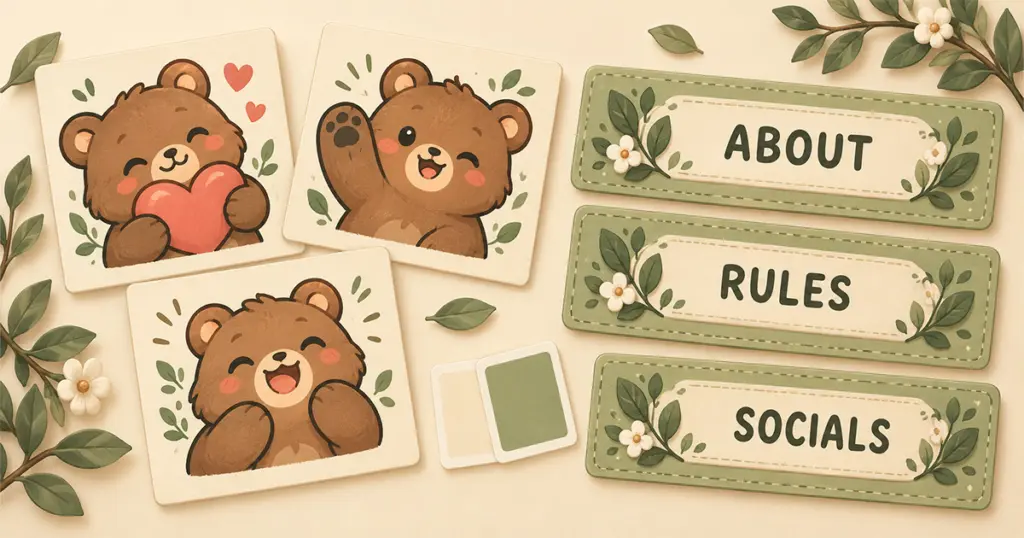
A consistent Twitch channel aesthetic can start with the graphics you already use. Pick one familiar element a favorite emote character, a color in your avatar, or the mood of your streams and use it to guide your next choice. Your emotes and panels can look related without every item featuring the same mascot.
If your channel currently mixes a few styles, start by deciding which part feels most like you. That gives you a reason to keep, pair, or replace something, instead of buying a whole new collection because the pieces arrived separately.
Choose an anchor for your Twitch channel aesthetic
Open your channel page and look at your current avatar, panels, and emotes together. Choose the element you would be most reluctant to lose. That is your anchor.
It might be a bear your regulars use in chat, a purple avatar, or a simple black-and-cream look you still enjoy. Write down what you want to carry forward: “warm colors and rounded shapes” is more useful than “cute,” because it gives you something specific to compare with product previews.
Twitch’s personal branding guide recommends making theme elements work together while allowing the look to evolve. For someone choosing finished graphics, that means finding a shared visual thread rather than requiring a perfectly matched set from the start.
Match a few visible details
When comparing ready made graphics, look beyond the theme name. Two products labeled “cozy” might have very different colors, outlines, and amounts of decoration.
These details can help you judge a pairing:
- Color: A shade already present in your avatar or emotes can connect them with a new panel set. The colors do not need to be identical.
- Shapes and outlines: Rounded labels often sit comfortably beside soft, expressive characters. Sharp borders and heavy outlines create a different impression.
- Visual detail: Quiet panels can give a lively emote collection room to stand out. Adding more characters everywhere may make the page feel crowded.
- Mood: Gentle expressions, muted colors, and bold neon graphics each suggest a different tone. Choose the combination that fits how your stream actually feels.
For example, brown bear emotes could work with cream or muted green panels even if those panels have no bears on them. Pinicon’s Sage Green Stream Panels use stitched edges and small leaf details without a character motif. They are one example of a panel style you could compare with an existing mascot, rather than replacing that mascot to match a new set.
Decide what needs to change
A mismatch does not automatically mean the artwork is poor. It may simply be doing a different job from the rest of your channel. Use the specific problem to decide where to spend your time or budget.
| What you notice | A useful next step |
|---|---|
| You like your emotes, but the panels feel unrelated | Keep the emotes and compare panel colors and shapes with them. |
| Each panel comes from a different set | Try one consistent panel style for the sections you actually use. |
| The colors work, but the page feels busy | Use fewer decorative images and give important information more space. |
| Everything matches, but it no longer feels like your stream | Choose a new anchor and update one part before committing to a full change. |
Avoid letting the number of files in a bundle make the decision for you. A smaller selection that suits your channel may be more useful than a large pack with many images you will leave unused.
Keep the information easy to read
Your panels also help visitors find information. Decorative lettering or a detailed background is a poor fit if you struggle to read the section title at its displayed size.
Once you have chosen a panel style, use clear labels and current information. A coordinated page with an outdated schedule or an empty social section still leaves visitors searching. Choose the sections you can fill, and follow the Twitch panel setup guide when you are ready to add them.
You can make the change gradually. Try the panels first and keep your familiar emotes in place. After a few streams, look at the page again and ask whether another change would solve a specific problem. If the colors feel connected, the text is readable, and your favorite reactions still belong, you may already have the channel look you wanted.